Display stereoscopic (3D) images from the WordPress media library using a Gutenberg block or shortcode.
Overview
Stereoscopic Image Viewer lets you embed 3D images on any WordPress post or page. It supports a wide range of source formats used by 3D cameras, phones, and editing software, and can display them in multiple viewing modes.

Download Stereoscopic Viewer
or from WordPress.org
Features
- Gutenberg block with live Canvas-rendered preview and full
InspectorControls shortcode for the classic editor and widget areas- Settings page with site-wide defaults for every parameter
- Swap left/right sources with a single toggle
- Width, border, and drop shadow controls per block
- Powered by stereo-img for hardware-accelerated 3D rendering
- Custom Canvas 2D renderer for anaglyph red-blue and interlaced formats
- Zero external requests — the stereo-img library is bundled locally by default
Supported Formats
Source Formats
| Format | Description |
|---|---|
left-right | Side-by-side, left eye on the left (or swapped) |
top-bottom | Top-bottom, left eye on top (or swapped) |
anaglyph-rc | Anaglyph red-cyan composite |
anaglyph-rb | Anaglyph red-blue composite |
interlaced-row | Row-interlaced (polarised display source) |
interlaced-col | Column-interlaced |
pair | Two separate images, one per eye |
Display Modes
| Mode | Requires Glasses? | Notes |
|---|---|---|
anaglyph-rc | Red-cyan glasses | Default |
anaglyph-rb | Red-blue glasses | |
wiggle | No | Alternating left/right frames |
left | No | Left eye only |
right | No | Right eye only |
side-by-side | Cross-eye or headset | Composite output |
top-bottom | Cross-eye or headset | Composite output |
interlaced-row | Polarised 3D display | |
interlaced-col | Polarised 3D display |
Installation
- Upload the
wp-stereoscopic-viewerfolder to/wp-content/plugins/. - Activate the plugin through the Plugins menu in WordPress.
- Visit Stereoscopic in the admin menu to configure site-wide defaults.
- Add the Stereoscopic Image block in the Gutenberg editor, or use the
shortcode.
Quick Start
The most common case — a side-by-side JPEG from a 3D camera, displayed as red-cyan anaglyph:
[sterimvi_image src="/wp-content/uploads/2026/07/Tiger.jpg" source_format="left-right" display_mode="anaglyph-rc"]Two separate files, wiggle output (no glasses needed):
[sterimvi_image src="/wp-content/uploads/2026/07/Tiger.jpg" src_right="https://example.com/right.jpg" source_format="pair" display_mode="wiggle"]Anamorphic (half-width side-by-side) source, red-cyan output, with border and drop shadow:
[sterimvi_image src="/wp-content/uploads/2026/07/Tiger.jpg" source_format="left-right" source_squeeze="1" display_mode="anaglyph-rc" border="1" border_width="2px" border_color="#222222" shadow="1" shadow_offset_x="0px" shadow_offset_y="6px" shadow_blur="16px" shadow_spread="0px" shadow_color="rgba(0,0,0,0.4)"]Shortcode Reference
Every parameter can be overridden per-shortcode; anything you omit falls back to the site-wide default from the settings page.
Source
| Attribute | Default | Description |
|---|---|---|
src | — | URL of the primary (or combined) source image. Required. |
src_right | — | URL of the right-eye image. Required only when source_format="pair". |
source_format | left-right | How the source encodes both eyes. |
source_squeeze | 0 | Set to 1 if the source is anamorphic (half-width SBS or half-height TB). |
Display
| Attribute | Default | Description |
|---|---|---|
display_mode | anaglyph-rc | How to present the image. |
display_squeeze | 0 | Set to 1 for anamorphic output. Only effective for side-by-side and top-bottom. |
swap | 0 | Set to 1 to swap left and right eye sources. |
controlslist | wiggle left right anaglyph | Space-separated mode-switching buttons. Tokens: wiggle, left, right, anaglyph. Leave empty to show all controls (including VR). Only applies when stereo-img handles rendering. |
Size & Style
| Attribute | Default | Description |
|---|---|---|
width | 100% | CSS width. Accepts px, %, or vw (e.g. 640px). |
border | 0 | Set to 1 to show a border. |
border_width | 1px | Border thickness (e.g. 2px). |
border_color | #000000 | Hex border color. |
shadow | 0 | Set to 1 to show a drop shadow. |
shadow_offset_x | 0px | Horizontal offset. Negative values move the shadow left. |
shadow_offset_y | 4px | Vertical offset. |
shadow_blur | 12px | Blur radius. |
shadow_spread | 0px | Spread radius. |
shadow_color | rgba(0,0,0,0.25) | Any CSS color: hex, rgb(), rgba(), hsl(), hsla(), or a named color. |
Examples
Side by Side Source Image
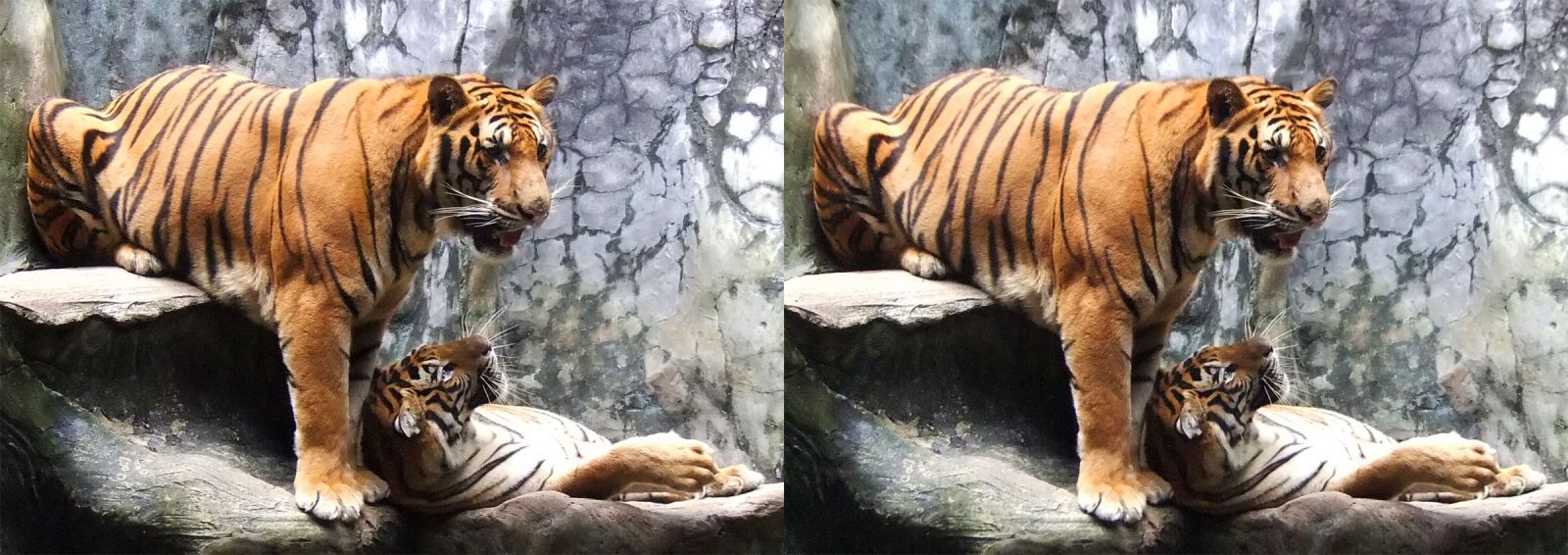
Anaglyph red-cyan output
[sterimvi_image src="/wp-content/uploads/2026/07/Tiger.jpg" source_format="left-right" display_mode="anaglyph-rc"]
Side by Side Source Image
Wiggle output
[sterimvi_image src="/wp-content/uploads/2026/07/Tiger.jpg" source_format="left-right" display_mode="wiggle"]
Top-Bottom source

Anaglyph Output
[sterimvi_image src="/wp-content/uploads/2026/07/Tiger-TB.jpg" source_format="top-bottom display_mode="anaglyph-rc"]
Anamorphic side-by-side source

Left Output
[sterimvi_image src="/wp-content/uploads/2026/07/TigerAnaH.jpg" source_format="left-right" source_squeeze="1" display_mode="left"]
Anamorphic top-bottom source

Right Output
[sterimvi_image src="/wp-content/uploads/2026/07/Tiger-TB-Ana.jpg" source_format="top-bottom" source_squeeze="1" display_mode="right"]
Separate Left and Right Sources


Wiggle Output
[sterimvi_image src="/wp-content/uploads/2026/07/Tiger-L.jpg" src_right="wp-content/uploads/2026/07/Tiger-R.jpg" source_format="pair" display_mode="wiggle"]
Side by Side Source Image
Squeezed Side-by-side output
[sterimvi_image src="/wp-content/uploads/2026/07/Tiger.jpg" source_format="left-right" display_mode="side-by-side" display_squeeze="1"]
Side by Side Source Image
Anaglyph Red-Blue output – Fixed 50% width
[sterimvi_image src="/wp-content/uploads/2026/07/Tiger.jpg" source_format="left-right" display_mode="anaglyph-rb" width="50%"]
Side by Side Source Image
Anaglyph Red-Blue output – With border and drop shadow
[sterimvi_image src="/wp-content/uploads/2026/07/Tiger.jpg" source_format="left-right" display_mode="anaglyph-rb" border="1" border_width="2px" border_color="#ff3333" shadow="1" shadow_offset_x="10px" shadow_offset_y="6px" shadow_blur="16px" shadow_spread="0px" shadow_color="rgba(255,0,0,.7)"]
Side by Side Source Image
Anaglyph red-cyan output – Just wiggle and anaglyph controls
[sterimvi_image src="/wp-content/uploads/2026/07/Tiger.jpg" source_format="left-right" display_mode="anaglyph-rc"controlslist="wiggle anaglyph"]
FAQ
What image formats are supported?
Any image format your browser supports: JPEG, PNG, WebP. Upload images through the standard WordPress media library.
Do I need special glasses?
It depends on the display mode you choose:
| Mode | Glasses needed? |
|---|---|
| Anaglyph red-cyan | Red-cyan 3D glasses |
| Anaglyph red-blue | Red-blue 3D glasses |
| Wiggle | None — creates a 3D illusion through motion |
| Left / Right only | None — shows one eye’s perspective |
My images load from an external URL and the anaglyph/interlaced modes don’t work.
Anaglyph red-blue and interlaced rendering use the browser Canvas API, which requires images to be served from the same domain (or with CORS headers). Images in the WordPress media library are always same-origin and work correctly. External URLs may trigger a CORS error.
Can I set different defaults for each image?
Yes. Every parameter can be overridden in the Gutenberg block’s InspectorControls sidebar, or as an attribute in the shortcode. The settings page provides the site-wide defaults used when a parameter is omitted.
Where does the stereo-img script load from?
By default the plugin serves the stereo-img web component (and its Three.js, exifr, and parser dependencies) from a copy bundled inside the plugin at assets/vendor/stereo-img/. No external requests are needed and the viewer will work offline.
If you prefer, you can switch the “stereo-img Load Method” on the settings page to:
- External CDN — load from
https://stereo-img.steren.fr/stereo-img.js. - Custom URL — load from any URL you specify. Because stereo-img uses relative ES-module imports for its dependencies, the URL must point to a complete stereo-img release directory tree (not just the single JS file).
Screenshots
Gutenberg block in the editor with InspectorControls open

Plugin Settings Page

Changelog
1.0.0
- Initial release.
License
Released under the GPLv2 or later.
The bundled stereo-img library is distributed under the Apache License 2.0. See assets/vendor/stereo-img/LICENSE for the full text. Three.js and exifr are bundled under their respective licences (see assets/vendor/stereo-img/vendor/three/LICENSE and assets/vendor/stereo-img/vendor/exifr/LICENSE).



